Starting an affiliate website can look much harder than it really is.
Affiliate marketing means recommending a product or service. You may earn money when someone buys something through your special link.
Some companies also pay you for other actions. For example, they may pay when someone signs up for a service.
That special link is called an affiliate link. To publish means to put something online for people to read.
An affiliate website is a website where you publish useful information and may include affiliate links.
You may be told to buy hosting before you start. Hosting is the service that keeps your website online.
You may also be told to buy extra tools or pay someone to design the site. Some advice says you should also collect email addresses and send emails to readers.
It may also tell you to learn how to get visitors from Google. A beginner does not need to do all of this at once.
Your first goal is smaller. Build a simple website that helps real people.
MakeMoneyOnlineBestTools.com (MMOBT) will show you the basic steps. The aim is to start with only what you need.
1. Quick Answer
| First decide whether a website will help you reach people. Then decide who you want to help and what the website should do for them. Choose how you will build it before buying hosting or extra tools. Choose a simple website name and web address. Create only the basic pages. Tell readers when you may earn money from a link. Publish useful information. After you publish, check how people find your website in Google. Add email, extra design, or other tools only when you truly need them. Affiliate marketing does not always require a website. |
2. Do You Actually Need an Affiliate Website?
Before you spend money or start building, answer one important question:
Will a website help you reach the people you want to help?
Some people can begin affiliate marketing without a website. The people you want to reach and help are your audience.
Some people already reach their audience through social media, videos, or other websites and apps.
Others use audio shows called podcasts. They may not need a website yet.
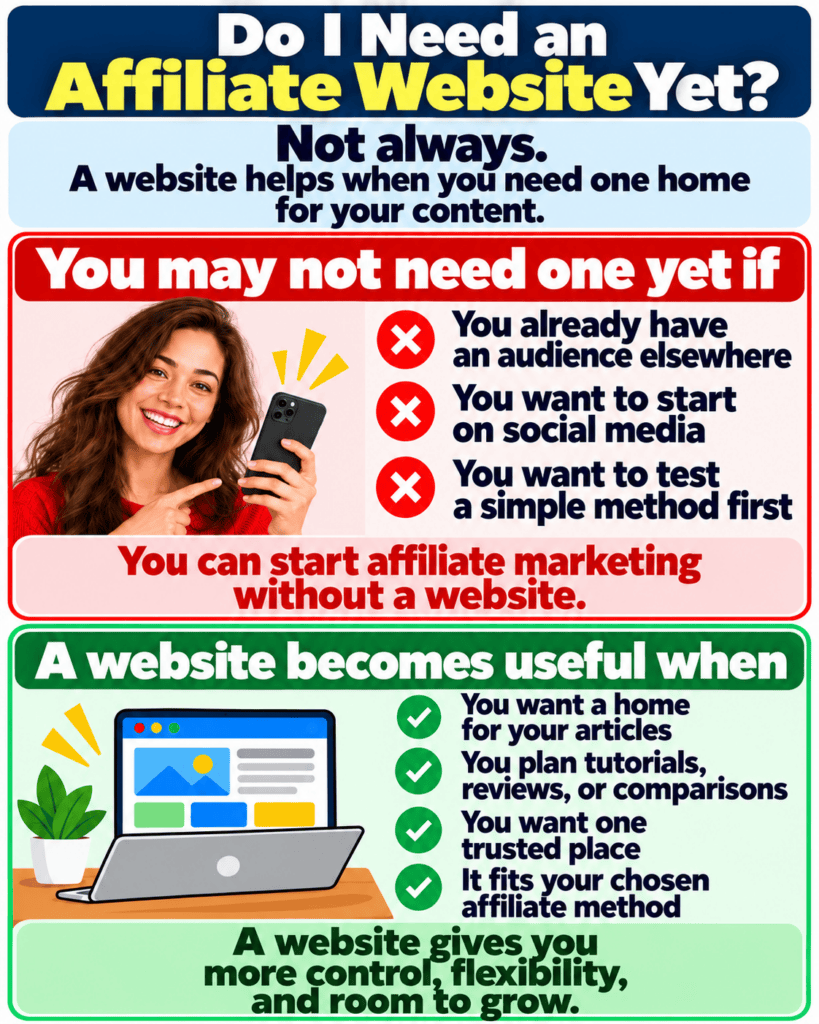
Articles, videos, posts, and other useful online material are often called content. A website becomes useful when you want one lasting place for your content.
It also gives people one place to learn about you and what you teach or write about.
You may later publish tutorials, reviews, or comparisons. A tutorial is a step-by-step lesson.
A review explains the good and bad points of one product or service. A comparison helps readers choose between two or more options.
Do not build a website only because someone says everyone doing affiliate marketing must have one.
Your website should have a clear purpose. Purpose means the main job of the website.
Ask yourself: “Will a website make it easier to help the people I want to reach?”
The graphic below uses the words affiliate method. This simply means the way you plan to do affiliate marketing.
It also uses the word flexibility. Here, flexibility means you can change or grow the website when your needs change.
3. Decide What Your Affiliate Website Is For
Do not begin with colors, logos, letter styles, or extra website tools.
Extra website tools that add features are often called plugins. Begin with the person you want to help.
Ask two simple questions. Who do you want to help? What problem will the website help them solve?
For example, you may want to help beginners choose simple home-office equipment.
“Help people understand and choose practical home-office equipment without wasting money.”
Your website’s purpose is its main job. One clear purpose can guide your early work. Your website does not need to help everybody.
Decide what readers can expect from your website. You might offer simple information, honest choices, clear warnings about problems, and useful advice.
4. Choose How You Will Build the Website
You can waste money by buying website tools before you decide how you will build the site.
There are two common ways to build a website. The graphics use the word route. Here, route means the way you choose to build the website.
Method 1: use a website builder that includes hosting. A website builder is an online service that helps you create the site.
In this method, the same company gives you the building tool and keeps the website online. This is often called a managed or all-in-one builder.
In simple words, one company handles more of the setup for you.
Method 2: use website software with separate hosting. You choose the software and pay a hosting company to keep the site online.
This is often called self-hosted. The name means the website software and hosting are separate.
It does not mean you keep the website on your own computer.
Neither method is best for everyone. Think about how much you can spend. Think about how much setup work you want to handle. Also think about what you need the website to do.
If you have not chosen how to build your website yet, read our website-builder guide. Its title is Best Website Builder for Affiliate Marketing.
Choose how you will build the website. Then come back to this article and follow the steps below.
If the method you choose already includes hosting, do not buy separate hosting. If it does not include hosting, you will need to choose a hosting service.
Three quick examples
- Grace chooses a website builder that includes hosting because she wants fewer setup decisions. She starts with the basic pages and useful content. She does not buy extra tools yet.
- David chooses website software that needs separate hosting because he is comfortable making more setup choices. He buys hosting only after making that choice. Then he builds the same simple website.
- Leah already reaches the people she wants to help through social media. She decides that she does not need a website yet. She does not build one only because other people in affiliate marketing have websites.
5. Choose a Simple Website Name and Web Address
After you choose how to build the website, choose a simple name for it.
A domain name is the web address people use to reach your site. Do not spend days trying to find a clever name.
A good domain name should be easy to read and remember. It should fit the topic you plan to cover. Avoid a name that is too narrow if you may want to grow later.
You do not need expensive branding before you publish.
Branding means the name, logo, colors, and overall look people connect with your website. A clear site name and simple design are enough to begin.
First decide how you will build the website. Then buy the domain name. Buy separate hosting only if the method you have chosen needs it.
6. Build the Basic Pages Your Website Needs
Website structure means the main pages on the site. It also means how readers move from one page to another.
Your first website does not need dozens of pages. It only needs a few basic pages and a simple menu.
A menu is the list of links people use to move around the site.
A simple website may include these pages:
- Home or Start Here – explains what the website helps people do.
- About – explains the purpose of the website and who runs it.
- Contact – gives readers a way to contact you.
- Affiliate Disclosure – tells readers that you may earn money from some links. A disclosure is a short notice that tells readers you may earn money from certain links. You may also need a short disclosure near a product or service you recommend.
- Some websites also need pages or notices about privacy, cookies, or website rules. A cookie is a small file a website may save on a visitor’s device. A privacy page explains how visitor information is collected or used. A terms page explains rules for using the website. Add these pages only when they apply to your country and to the services your website uses.
Do not copy these pages from another website and assume they are right for you. Rules can differ by country and by the services you use.
Keep the menu simple. Readers should be able to find the main information easily.
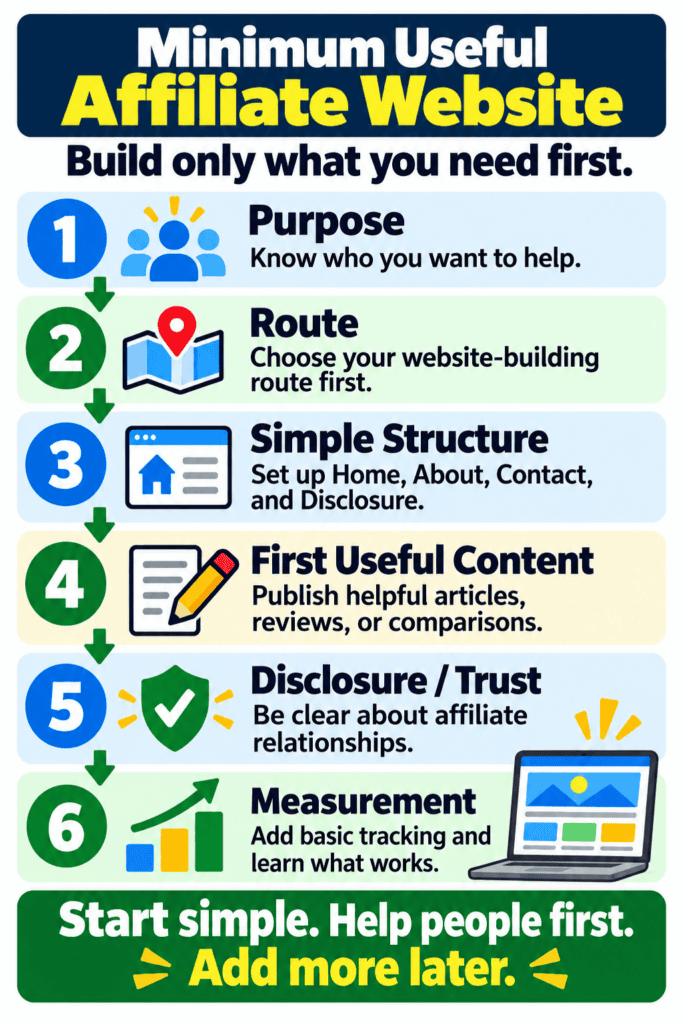
The graphic below uses a few short words that may be new. Route means how you choose to build the website.
Trust means being open about who you are and how you may earn money.
Measurement means checking simple information, such as how often your pages appear in Google and how many people click them.
Tracking means checking this information over time. An affiliate relationship means you may earn money by recommending a company’s product or service.
The graphic also uses the word minimum. Here, minimum means only what you truly need.
7. Tell Readers When You May Earn Money
When you use affiliate links, be open about how you may earn money from them.
If you may earn money when a reader uses one of your links, tell the reader clearly.
In the United States, the Federal Trade Commission (FTC) explains how to tell readers about this. If you may earn money from a recommendation or affiliate link, say so clearly.
This notice is called an affiliate disclosure. It should be easy to see and understand.
Put it close to the product or service you recommend, or close to the affiliate link. A separate disclosure page may not be enough by itself.
Our Affiliate Link Disclosure guide explains this in more detail.
Rules may differ outside the United States. Rules about disclosures, privacy, taxes, and running a business may be different in your country.
Check the rules that apply to you. MMOBT gives general information, not legal advice for your personal situation.
The simple rule is this: if you may earn money from a link, tell readers clearly.
8. Keep the Website Simple and Easy to Use on a Phone
It is easy to spend too much time making a new website look impressive.
A beginner website should be easy to use before it looks impressive. Use clear text and short paragraphs.
Keep the menu simple. Check that buttons and links work well on a phone.
Do not fill every page with moving effects or boxes that suddenly cover the screen. Large design sections that add no useful information can also make reading harder.
Use the same simple layout for your articles. Make headings, main text, links, images, and places where you recommend products easy to recognize.
Design should help the reader. Do not let design delay useful content.
9. Publish Your First Useful Information
A beautiful empty website does not help people. Once the basic pages are ready, publish useful information that answers real questions.
Do not wait until you have many articles. Start with articles or pages that match the purpose of your website.
Some articles may teach. Others may help readers choose between products or services. Do not make every article a product review.
A trustworthy affiliate website should help readers even when they do not buy anything.
For example, a home-office website might first explain how to choose a desk chair. Later, it could compare suitable chairs when a reader is ready to choose one.
Do not repeat earlier research about your website topic or the companies whose products you may recommend.
You already made those choices. Now publish useful content for the people you want to help.
10. Check How People Find Your Website
After you publish, check a few simple results. Look at how often your pages appear in Google Search.
Look at how many people click them, and what words people type into Google before finding your pages.
You can also check your average position, which gives you a rough idea of where your pages appear in Google results.
Google Search Console can show you this information.
Google Search Console is a free Google tool that shows how your site appears in Google Search.
It can show you the words people typed into Google before your pages appeared.
It can also show you how often your pages appeared and how many times people clicked them.
Google Search Console also shows an average position number. This gives you a rough idea of where your pages appeared in Google results.
These numbers can help you see what people are finding and clicking.
Your website builder or hosting company may also show simple visitor numbers. What you see depends on the company you use.
Track only what helps you learn. Add more reports later, when you have enough visitors for the extra information to be useful.
11. Add an Email List Only When You Know Why You Need It
An email list is a list of people who asked to receive emails from you. It can help you keep helping readers after they leave your website.
You do not need an email list before the website can exist.
Ask what the email list will do. Will you send useful lessons? Will you help readers complete a task? Will you tell them about new articles that match their interests?
If there is no clear purpose yet, you can wait.
If you know why you need an email list, use our email-list lesson after we publish it. Its title is How to Build an Email List for Affiliate Marketing.
Choosing which company or tool will send your emails is a separate decision.
Add a tool only when you truly need it.
12. Build Now, Add Later, or Do Not Buy Yet
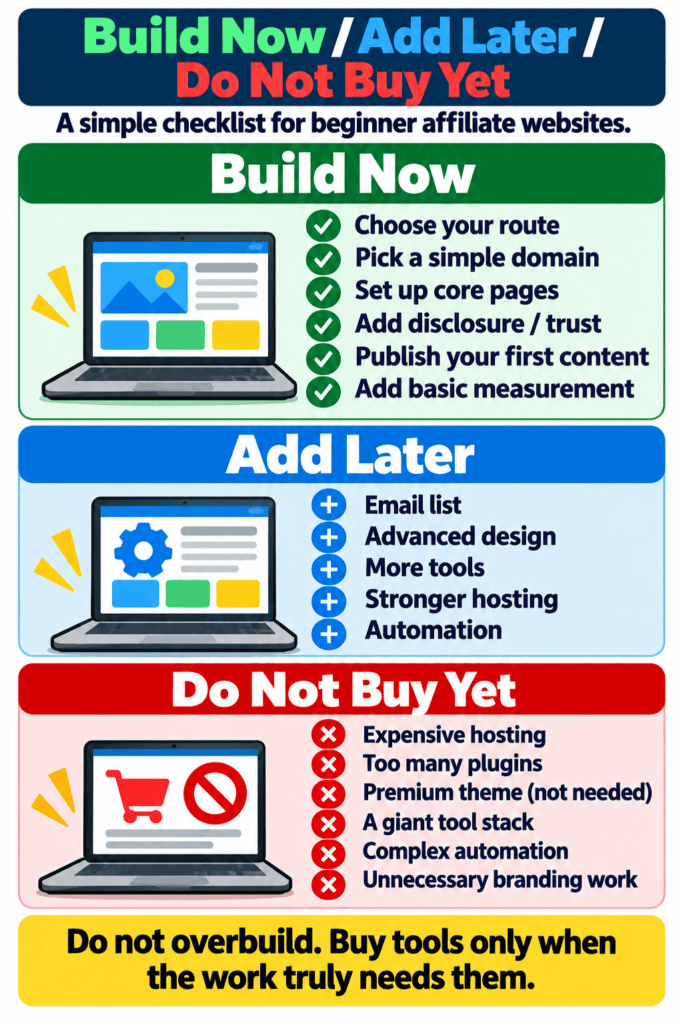
A beginner can save money by putting each task or purchase into one of three groups. The groups are: build now, add later, and do not buy yet.
Build now: decide what the website will do and how you will build it. Choose a simple name and create the basic pages.
Tell readers when you may earn money from a link. Publish useful information and check how people find your website.
Add later: an email list, extra design features, and tools that do repeated tasks for you.
A more powerful hosting plan can also wait until your website actually needs one.
Do not buy a paid website design or extra design software just because someone recommends it.
Many extra tools can also wait. Do not buy a tool only because someone says you must have it.
Before you add a tool, ask: “What problem will this solve?” If you do not have a clear answer, wait.
The graphic below uses a few terms that may be new. Core pages means the basic pages your website needs.
A premium theme is a paid website design. A tool stack means all the website tools you use together.
Automation means using a tool to do repeated tasks for you. Advanced design means more complicated design work.
Stronger hosting means a hosting plan designed to handle more visitors or more website activity.
Overbuild means adding more tools, design, or features than you need.
13. Practical Action: Build the Smallest Useful Affiliate Website
Do not try to finish everything today. Use these steps in this order:
1. Decide what the website will do.
2. Decide how you will build it.
3. Choose a domain name.
4. Create the basic pages.
5. Tell readers when you may earn money.
6. Publish useful information.
7. Check how people find your website.
8. Choose your next step.
Find the first part that is still missing.
- If you have not decided what the website will do, start with its purpose. Then decide who you want to help.
- Still deciding how to build the site? Read Best Website Builder for Affiliate Marketing.
- If the website exists but the basic pages are missing, create them.
- If the basic pages are ready, publish useful information that answers a real reader question.
- If you will use affiliate links, tell readers clearly that you may earn money from them. Do this before you publish the links. Use our Affiliate Link Disclosure guide if you need help.
- Then use Section 9 to check how people find your website.
One completed useful step is better than buying five more tools.
14. Common Mistakes to Avoid
Buying hosting before choosing how you will build the website. You may pay for a service you do not need.
Spending days on logos, design, and extra tools before publishing useful content.
The website exists to help people. Do not let design work delay that job.
Repeating earlier research instead of building the site. Once you have chosen the website topic and the companies you may recommend, stop repeating that research.
Start building the site.
Publishing affiliate links without telling readers that you may earn money from them.
Tell readers clearly before they reach the affiliate link.
Assuming the website alone will bring visitors, high positions in Google results, or income. A website is a tool. You still need useful content and a way for people to find it.
Adding too many tools before you need them. Each extra tool can cost money and give you more things to update and manage.
15. Key Points to Remember and Your Next Step
Start an affiliate website with a real problem you can help readers solve. Do not start with a list of tools to buy.
You do not have to build a website for every way of doing affiliate marketing.
When a website will help you reach readers, give it one clear purpose. Build only what you need to help readers clearly and honestly.
Choose how you will build the website before buying hosting or other tools. Keep the domain name and design simple.
Create only the basic pages. Publish useful information early. Tell readers when you may earn money from a link.
Check how people find your website in Google.
Choose the next guide that matches what you still need to do.
- To choose how to build the website, read Best Website Builder for Affiliate Marketing.
- If the website is ready and you need more help with disclosure, read Affiliate Link Disclosure.
- When the website is ready, you may want to learn how to share affiliate links. Read How to Promote Affiliate Links.
- If you use email to keep helping readers, use our email-list lesson after we publish it. Its title is How to Build an Email List for Affiliate Marketing. Choose an email service only when you need one.
The Free Affiliate First 7 Days Kit gives true beginners a simple seven-day starting plan.
You do not have to use it. It should not replace this lesson or pressure you to buy a website tool or service.
The goal is not to build the biggest website you can. Build the simplest useful website that is ready to help readers.