Starting an online business does not always require a large amount of money. But that does not mean every online business can start for free.
Your costs depend on the kind of business you choose, what you already have, and what you truly need before you can serve a customer. A simple budget can help you see those costs before you spend.
1. Quick Answer
There is no single answer to how much it costs to start an online business. A service business may need little equipment.
An ecommerce business selling physical products may need money for inventory, packaging, shipping, and other costs.
A better approach is to divide your budget into four groups: Essential Now, Optional Now, Ongoing, and Model-Specific.
Then look at how each cost is paid. Some costs happen once. Others return monthly or yearly, or happen each time you make a sale.
Add a small amount for unexpected expenses.
Start with only what you need, but remember that internet access, required fees, renewals, payment charges, and your time are still real costs.
2. Why Your Startup Budget Matters
It is easy to spend too much when you are excited about a new business.
You may see websites, software, courses, logos, advertising, and other tools that seem necessary.
Some may become useful later. That does not mean you need them before your first customer.
The opposite problem can also happen. You may plan as though the business will cost almost nothing.
Then a registration fee, yearly renewal, payment charge, shipping cost, or software bill appears later.
Both mistakes can create problems for a new business.
A careful startup budget helps you protect the money you have while still paying for what the business truly needs.
The goal is not to build the cheapest business possible. The goal is to spend carefully on the things that help you start honestly and serve real customers.
3. Start With the Business Model
Before you estimate your startup costs, be clear about the kind of online business you want to build. Different business models have different needs.
A person who sells a service may need little more than a suitable device and internet access. They also need a way to communicate with clients and receive payment.
Someone selling a digital product, such as an ebook, template, or downloadable guide, may need software to create it. They also need a place to sell or deliver the product.
An ecommerce business that sells physical products may also need inventory, packaging, shipping supplies, and other selling costs.
A teacher or coach may need video-call software, teaching materials, scheduling tools, or a platform for delivering lessons.
A content-based business, such as a blog or video business, may need a website, recording equipment, editing tools, or publishing tools.
This is why one startup-cost figure is not very useful for everyone. Two people can both start online businesses and still need very different budgets.
Before you buy anything, write down your business model.
Then ask a simple question:
What must this business actually do for the customer?
That answer gives you a better starting point for your budget.
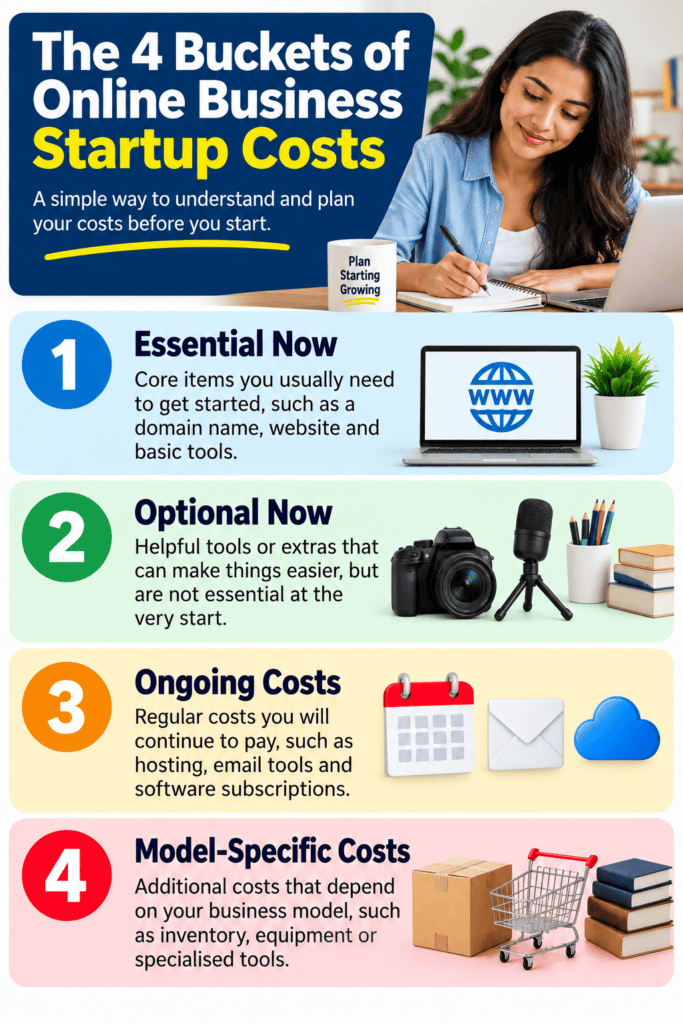
4. Bucket 1: Essential Now
Essential Now means a cost you truly need for the first workable version of your business.
Ask yourself:
Can I honestly start serving customers without this?
If the answer is no, the cost may belong here.
Depending on the business, essential costs may include:
- a usable phone or computer;
- reliable internet access;
- a way to communicate with customers;
- a way to receive payment;
- required registration or licenses where they apply;
- basic equipment needed to provide the service or make the product;
- a simple way for customers to understand what you offer.
Do not confuse helpful with essential.
A professional logo may be helpful. A premium website may be helpful. Extra software may also be helpful.
But can the business operate properly without them right now? That is the better question.
Suppose you want to offer online bookkeeping services.
You may need a suitable computer, internet access, and the software required for the work. You may also need a safe way to handle client information and communicate with clients.
You may not need expensive branding, paid advertising, several social media tools, and a custom-built website before you have your first client.
Spend first on what helps you provide the service properly.
5. Bucket 2: Optional Now
Optional Now means something that may improve the business but does not have to be purchased before you start.
Examples may include:
- premium website features;
- custom logo design;
- paid templates;
- extra software;
- advanced automated features;
- premium scheduling tools;
- professional photography;
- paid advertising;
- upgraded equipment when your present equipment can already do the job.
Optional does not mean useless. Some optional expenses can save time or improve the customer experience. They simply do not need to come first.
This is one of the easiest places for a beginner to overspend.
You may see another business with professional branding, several paid tools, and a polished website. But that business may have been operating for years.
You do not have to begin where an established business is now. Start with your present needs. You can improve the business as customers show you what is worth adding.
6. Bucket 3: Ongoing Costs
Some expenses continue after the business starts. These are ongoing costs.
An ongoing cost is an expense you pay again. It may return every month, every year, or as the business continues operating.
Examples may include:
- internet service;
- website hosting;
- software subscriptions;
- domain-name renewal;
- communication services;
- marketing;
- equipment maintenance;
- professional services;
- registration or license renewals where required.
Look beyond the first payment. A tool may seem affordable today, but you also need to know what it will cost to keep using it.
For example, a website service may charge monthly or yearly.
A domain name, which is the address people use to reach your website, usually needs to be renewed. Software may also require regular payments.
Ask:
What will this cost me to keep using?
That question can stop a small startup budget from slowly becoming too expensive.
Do not forget costs connected with each sale
Some costs change as you sell more. These are often called variable costs. A variable cost goes up or down as business activity changes.
For example, a business that sells physical products may spend more on packaging and shipping when it makes more sales.
A transaction fee is a charge connected with a payment or sale. A payment company or online marketplace may charge one when a customer pays you.
The important question is simple:
Will this cost happen again because I made another sale or received another payment?
If yes, include it in your budget.
7. Bucket 4: Model-Specific Costs
Some expenses exist mainly because of the kind of business you chose. These are model-specific costs.
Service business
A service business may need:
- equipment used to do the work;
- professional software;
- communication tools;
- tools used to deliver work to clients;
- scheduling;
- insurance or professional requirements where they apply.
A beginner may already own some of what is needed. That can reduce the amount of new money required.
Digital-product business
A digital-product business may need:
- software used to create the product;
- design tools;
- a place to sell the product;
- payment services;
- a way to deliver the product;
- customer support tools.
A simple digital product may not require many paid tools at first. Focus on what you need to create, sell, deliver, and support the product properly.
Ecommerce or inventory-based business
A business that sells physical products online may have additional costs such as:
- inventory;
- samples;
- packaging;
- shipping materials;
- storage;
- marketplace or store fees;
- payment charges;
- returns;
- product photography;
- shipping.
Inventory means the products or goods a business keeps to sell.
This type of business may need more money before the first sale because the products often have to be bought or made first.
But the amount can vary greatly. That is another reason not to copy someone else’s startup-cost figure.
Teaching or coaching business
An online teacher, tutor, or coach may need:
- a reliable computer or phone;
- good internet access;
- video-call software;
- teaching materials;
- scheduling;
- payment services;
- special tools related to the subject being taught.
Some people can start with tools they already have. Others may need extra equipment because of the kind of teaching they provide.
Content or audience-based business
A content-based business may use:
- a website;
- website hosting;
- a domain name;
- design or editing tools;
- recording equipment;
- email services;
- publishing tools.
Not every content business needs every item from the first day. Choose according to how you plan to reach and serve people.
8. Build a Lean First Budget
Now you can turn your list of possible costs into a real budget. A lean budget means spending only on what you need to start and operate properly at your present stage.
There are two useful ways to sort each expense. First, place it in one of the four budget groups: Essential Now, Optional Now, Ongoing, or Model-Specific.
Then record how the cost is paid.
One-time costs
These are costs you expect to pay once, such as during startup or for a specific setup.
Examples may include equipment, initial design work, or a setup fee.
Do not call something a one-time cost if you will have to renew it later.
Monthly or yearly costs
These costs return on a schedule.
Examples may include hosting, software, internet service, and yearly renewals.
Even when you pay once a year, remember that the next payment will come later.
Variable or transaction costs
These costs change with sales or business activity.
They may include payment charges, shipping, packaging, marketplace fees, or other expenses connected with a sale.
Contingency
A contingency is a small amount of money you set aside for an unexpected expense.
It is not a fifth budget bucket. It is simply a small extra amount in your overall budget in case something costs more than expected.
You do not need to make it large. But leaving no room at all for an unexpected expense can cause problems.
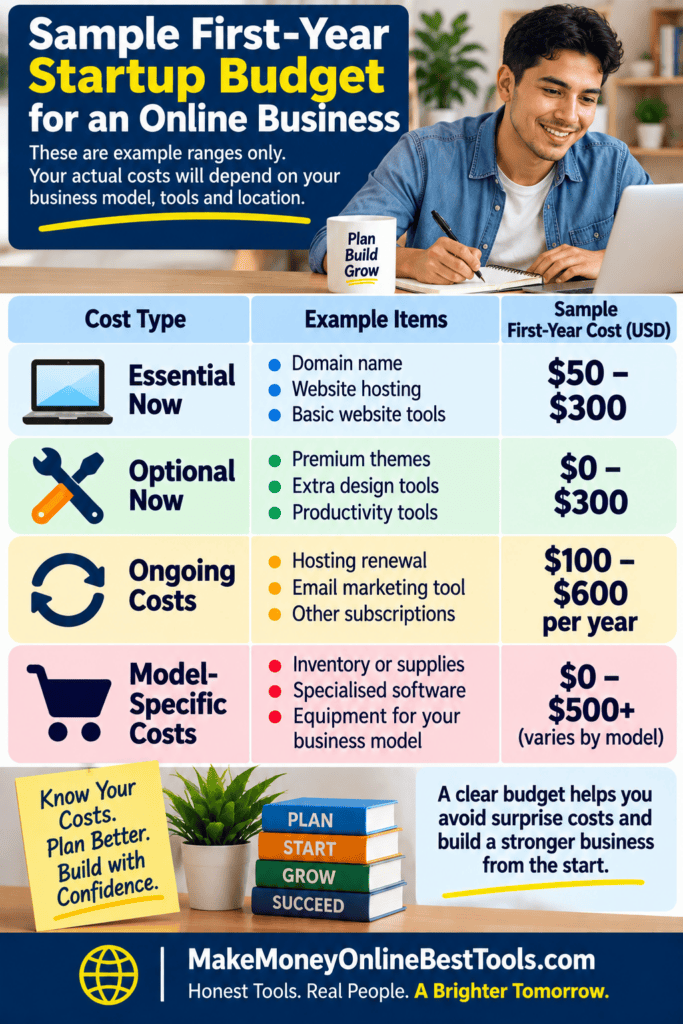
Here is a simple example:
1. Internet access
Budget group: Essential Now
Payment type: Monthly or regular
Needed now? Yes
2. Basic business tool
Budget group: Essential Now
Payment type: One-time or regular
Needed now? Depends on the business
3. Premium logo
Budget group: Optional Now
Payment type: One-time
Needed now? Usually no
4. Payment charge
Budget group: Ongoing
Payment type: Variable/transaction
Needed now? When sales begin
5. Inventory
Budget group: Model-Specific
Payment type: One-time or variable
Needed now? Physical-product business
This is not a budget that every business should copy.
It only shows how you can organize your own costs.
9. Compare Free and Paid Tools Only After You Know the Need
Free tools can be useful when you are starting. They may help you test an idea without adding too many expenses.
But free does not always mean there is no cost.
A free tool may limit features, storage, customers, support, or the amount of work you can do. It may also take more of your time.
Paid does not automatically mean better. A paid tool is worth considering only when it solves a real problem for your business.
Before paying, ask:
- What problem does this solve?
- Do I have that problem now?
- Can my present tool do the job?
- What happens if I keep using the free option for a while longer?
- Will the paid tool save enough time or improve the business enough to make the cost worthwhile?
- Will I have to pay again later?
Do not buy software only because someone else says every business needs it. Let the business need come first. Then decide whether the tool is worth paying for.
10. Review Your Budget After Your First Real Customer or Sales Test
Your first budget is not permanent. It is your best plan before you have much information from real customers.
Once you begin serving people, you will learn more. You may discover that an expense you thought was essential does not matter very much.
You may also find that something you delayed would now save time or improve your service.
Review the budget after you have real customer evidence.
A freelancer may discover that clients are happy to communicate through a tool already being used. There may be no need to pay for another one.
A digital-product seller may learn that customers need clearer instructions. Improving those instructions may help more than buying a premium design tool.
An ecommerce seller may discover that packaging costs more than expected. The budget can then be adjusted before sales increase.
Real customers can show you where your money is most useful. Add spending when the business gives you a good reason. Remove spending that is not helping.
11. Common Online Business Budget Mistakes
Copying someone else’s budget
Another business may use different tools, sell something different, operate in another place, or be at a later stage.
Use other budgets for ideas, not as instructions. Build your budget around your own business.
Ignoring ongoing costs
A startup price can look small when renewals and subscriptions are left out. Write down what you will have to keep paying.
Forgetting transaction and selling fees
A small fee on one sale may become important after many sales. Know which costs increase when your business activity increases.
Buying too many tools before testing demand
Several paid services can quickly create a large monthly bill. You may need some of them later. That does not mean you need them before customers show real interest.
Treating every free tool as cost-free
Free plans can have limits. Your time also has value. Use free options where they truly help, but understand their limits.
Using one average startup cost as your budget
An average may include businesses that are nothing like yours. A small service business and an inventory-based ecommerce business should not be expected to have the same startup costs.
Build your budget from your own needs.
Forgetting registration and setup requirements
Registration, licenses, permits, taxes, and other requirements can depend on where you live and the kind of business you operate. Do not assume another person’s requirements apply to you.
For readers in the United States, state and local requirements may differ. Readers in other countries should check the official requirements that apply where they live.
12. Practical Action: Build Your First Startup Budget
You can build your first budget without buying anything today. Start with a blank page, document, or spreadsheet.
Write your business model at the top. Then list every cost you think you may have.
Beside each item, mark one of these four groups:
Essential Now — I need this for the first workable version of the business.
Optional Now — This may help, but I can probably start without it.
Ongoing — I will have to pay this again.
Model-Specific — I have this cost because of the type of business I chose.
Next, mark how you will pay the cost:
- one-time;
- monthly or yearly;
- variable or transaction-based.
Then add a small contingency amount to your overall budget for unexpected expenses.
Now look at the list again. Remove anything you included only because another business has it. Check whether a lower-cost option can do the job properly.
Then verify any registration or setup requirements that apply to your business and location.
If marketing is part of your budget, first decide what you truly need to reach your first customers. Do that before paying for advertising or extra marketing tools.
Once you complete these steps, you have something more useful than a general startup-cost number. You have a budget built around your own business.
13. Key Points to Remember
- There is no single startup price that fits every online business.
- Start with your business model before estimating costs.
- Separate Essential Now, Optional Now, Ongoing, and Model-Specific expenses.
- Also record whether each cost is one-time, regular, or variable. Add a small reserve for unexpected expenses.
- A free tool can have limits. A paid tool is not automatically better.
- Do not copy the budget of a different business.
- Start with what you truly need and add expenses when real business needs give you a reason.
- Review your budget after you begin serving real customers.
- Check official registration and setup requirements for your location.